Operational Risk Assessment Software: implement ISO 31000:2018 with SpeakUp4Safety
If you need operational risk assessment software, focus on one goal: help teams assess risk on the field and act on it quickly.
Therefore, this guide shows how SpeakUp4Safety supports the full cycle—from mobile assessments to corrective actions and dashboards.
What is an Operational Risk Assessment?
An Operational Risk Assessment helps you identify hazards, rate risk, and choose controls for a specific task.
In other words, it supports daily decisions at the workstation.
For example, it helps a team answer: What can go wrong? How likely is it? How bad could it be? What will we do now?
Many companies still store risk assessments in spreadsheets and PDFs. However, teams rarely update those files when conditions change.
As a result, controls drift and follow-up actions get lost. SpeakUp4Safety solves this problem because it makes risk work simple to run on the field.
ISO 31000:2018 for operational risk assessment software
This article follows the logic of
ISO 31000:2018 — Risk management.
ISO 31000 helps organizations manage uncertainty. Moreover, it improves decisions by using a structured approach.
It includes principles, a framework, and a practical process.
Note: ISO standards are copyrighted by ISO. Here you find a practical implementation guide.
How operational risk assessment software supports ISO 31000 principles
ISO 31000 expects risk management to be integrated, structured, and dynamic. Therefore, your tools should support real work and real people.
In addition, they should collect evidence and keep a trace of decisions.
Teams use the same workflow during planning and execution. Consequently, risk stays connected to daily work.
A consistent form guides the assessment. As a result, you can compare risk across tasks and areas.
You configure hazards and lists for your site. Therefore, the tool matches your real processes.
Workers add practical knowledge. Moreover, the system makes reporting easy on mobile.
Teams update assessments when conditions change. Then, they track residual risk and trends.
Photos and notes support decisions. For example, you can attach evidence directly in the assessment.
ISO 31000 framework (how to embed risk management)
- Leadership & commitment: leaders set direction and assign resources.
- Integration: you connect risk assessment to planning and corrective actions.
- Design & implementation: you define criteria, roles, and an easy workflow.
- Evaluation: you review effectiveness using residual risk and recurring hazards.
- Improvement: you update controls and training based on results.
ISO 31000 process (the operational loop)
The ISO 31000 process moves from context to assessment and treatment. Then it continues with monitoring and review.
Finally, it relies on recording and reporting to preserve learning.
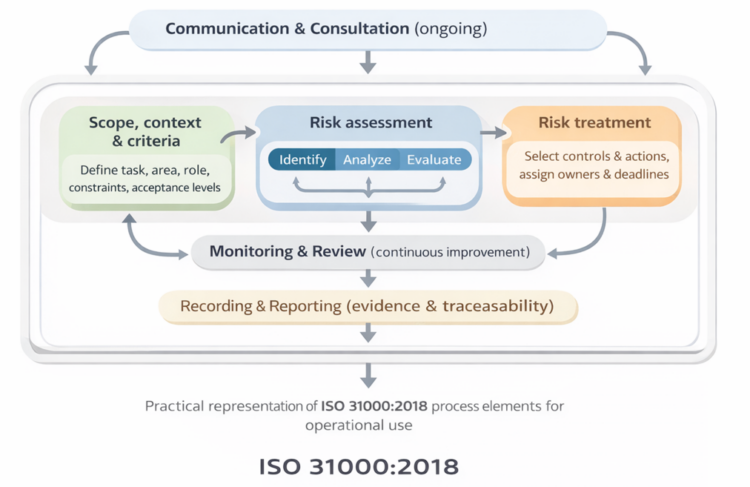
Infographic description (ISO 31000 in practice)
- Scope, context & criteria: define task, area, role, and acceptance levels.
- Risk assessment: identify hazards and rate likelihood and severity.
- Risk treatment: record controls and plan mitigation actions.
- Monitoring & review: track residual risk and verify results.
- Recording & reporting: keep traceability for audits and learning.
Near Miss & Incident Reporting
because it helps you learn from events and improve prevention.
Option 1 — Standalone App for fast risk assessments
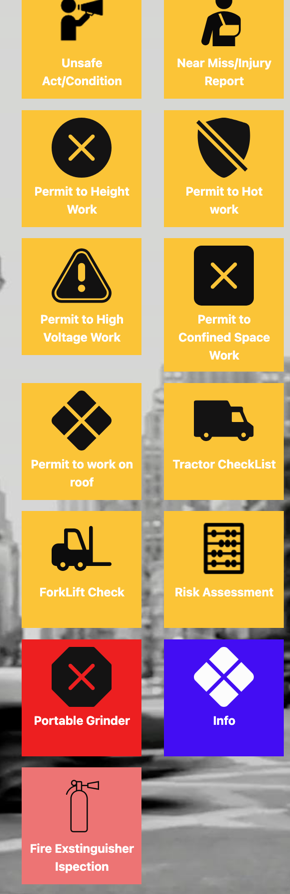
First, users download the app. Next, they run the risk assessment on the field. Then, they send the report by email to the EHS Manager.
This option keeps the workflow simple and quick.
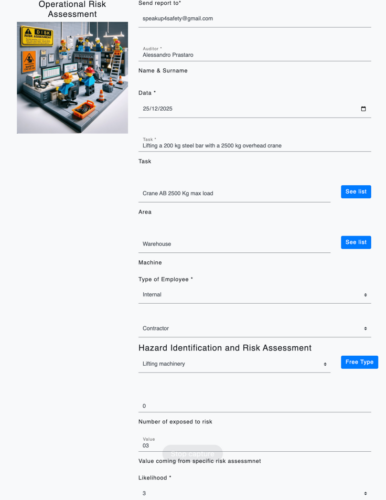
As a result, the assessment stays linked to the real work context.
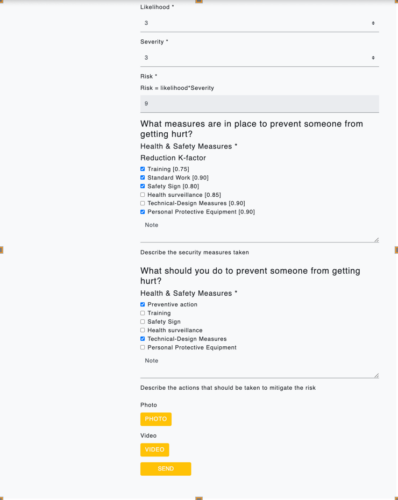
Moreover, attach photo or video evidence before sending the report.
How it works (field workflow)
- Download SpeakUp4Safety from the official stores.
- Open the Risk Assessment module.
- Define the context and select the hazard category.
- Score likelihood and severity, then document controls and actions.
- Attach evidence and send the report by email.
compare licenses and consider the Medium plan.
Option 2 — Medium License: app + management software
With the Medium license, you connect the app to the management platform. Therefore, you standardize lists and store all data in one place.
In addition, you track corrective actions and monitor results through dashboards.
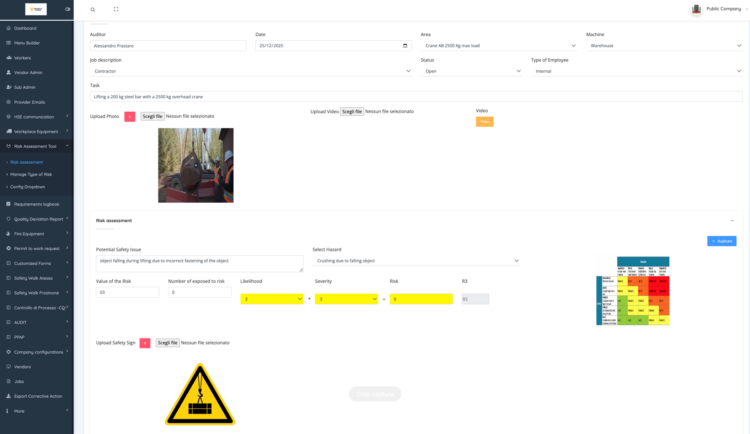
Then, duplicate the assessment to scale it across similar tasks.

As a result, the team can prove risk reduction over time.
- Standardized dropdowns for hazards, areas, roles, and workstations.
- Central database for assessments, evidence, and follow-up.
- Corrective Action Logbook with owner, due date, and status.
- Dashboards that show initial vs mitigated risk and recurring hazards.
Operational risk assessment becomes stronger when combined with structured incident and near miss reporting
Compare licenses and choose your best fit
Start with mobile assessments today. Then, upgrade to Medium to manage actions and dashboards across the organization.
Frequently Asked Questions (FAQ)
Which focus keyphrase should I use in Yoast?
Use operational risk assessment software. It matches search intent and reflects the app + platform workflow.
Does SpeakUp4Safety support ISO 31000?
Yes. It helps teams define context, assess risk, plan actions, and monitor results. Moreover, it keeps traceability for audits and learning.
Near Miss & Incident Reporting
Conclusion
ISO 31000 gives a clear logic for managing uncertainty. SpeakUp4Safety makes that logic practical on the shopfloor.
First, teams run assessments in the app. Next, they plan actions. Finally, they track results with dashboards.