Management: Costs, Risk and ROI
EHS software vs paper forms: build digital workflows and deploy them instantly to the SpeakUp4Safety app
Paper-based safety creates delays, inconsistent data and weak traceability. A modern EHS software should do more than “collect reports”: it must help you standardize inspections, near miss reporting, audits and corrective actions across sites — with governance, evidence and measurable outcomes. With SpeakUp4Safety you can build no-code forms, publish them with approval, and make them available in the SpeakUp4Safety mobile app in real time.
- Higher data quality: mandatory fields, dropdowns and structured inputs reduce missing or inconsistent information.
- Faster reporting at the point of work: workers can submit from mobile with photo/video evidence.
- Audit-ready traceability: timestamps, attachments and controlled release make audits faster and more reliable.
- Standardization across sites: one template deployed everywhere prevents local variations and rework.
- Full closure loop: findings flow into CAPA and risk evaluation, not into an “endless paper archive”.
Tip: this works especially well when combined with the Near Miss workflow to turn observations into prevention. See the pillar page: Near Miss & Incident Reporting.
Paperless EHS: document dematerialization that protects the environment
Beyond operational efficiency, SpeakUp4Safety helps organizations reduce paper consumption and support environmental protection. By replacing paper-based checklists, inspections and reports with digital workflows, companies can accelerate document dematerialization—reducing printing, physical archiving and unnecessary rework. For many organizations, going digital is now a practical sustainability action: fewer paper documents, fewer copies, fewer folders, and a more disciplined process where information is collected once and reused across audits, CAPA and risk reviews.
Practical rule of thumb (approximate): 1 tree ≈ 8,300 A4 sheets of office paper. The exact value varies by paper type and weight. This estimate is commonly referenced in sustainability assessments and environmental reporting.
- Trees saved ≈ Pages avoided per year ÷ 8,300
- If an average paper form is 2 pages: Pages avoided ≈ Number of submissions × 2
Examples (2 pages per submission):
- 100 submissions/month → 2,400 pages/year → ~0.29 trees/year
- 1,000 submissions/month → 24,000 pages/year → ~2.89 trees/year
- 5,000 submissions/month → 120,000 pages/year → ~14.46 trees/year
GHG emissions impact: Paper production, printing and distribution are associated with CO₂-equivalent emissions that can be quantified using recognized carbon accounting tools. For reference:
- US EPA – GHG Emission Factors Hub (emission factors for paper and office materials)
- GHG Protocol – Calculation Tools (widely used for corporate Scope 3 reporting)
- Environmental Paper Calculator (estimates trees, water, energy and CO₂ saved by reducing paper use)
By digitizing EHS forms with SpeakUp4Safety, organizations can support document dematerialization, reduce Scope 3 emissions linked to paper consumption, and align safety management with broader ESG and sustainability goals.
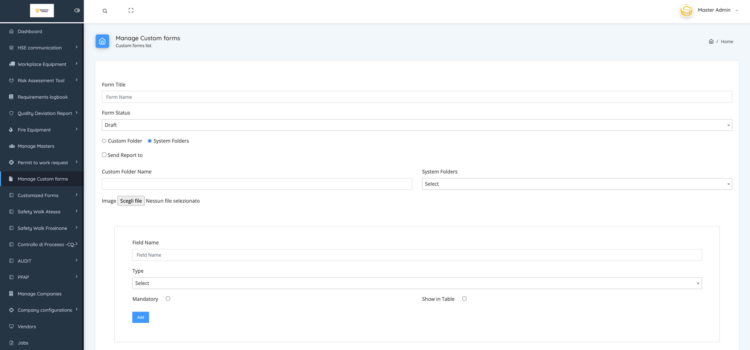
Step 1 — Create a custom form in the web platform (no code)
From the Administrator account, open Manage Custom Forms and click Add. The Form Builder provides multiple tools to design your form in minutes: text fields, date/time, checkbox lists, dropdowns, text area, photo and video upload, PDF document upload, and email routing (“send email to”). To ensure governance and consistency, you can also manage a publication workflow (draft → approval → published) and release the final form in a controlled way.
- Text, Text area (short & long descriptions)
- Date, Time
- Checkbox list, Dropdown
- Photo & Video evidence
- PDF upload (procedures, permits, certificates)
- Send email to (automatic routing/notifications)
Step 2 — Publish the form and generate a shareable URL
Once approved and released, SpeakUp4Safety automatically generates a dedicated URL for the form. This URL is managed in a dedicated section of the platform and acts as the bridge between the web management software and the mobile app: the same standardized structure becomes instantly available for the workforce to use on site.
- Fast rollout: deploy new forms without waiting for app updates.
- Controlled governance: publish only approved versions and maintain consistency.
- Scalable libraries: build a company-specific EHS toolbox (Near Miss, Safety Walks, PTW, audits, inspections).
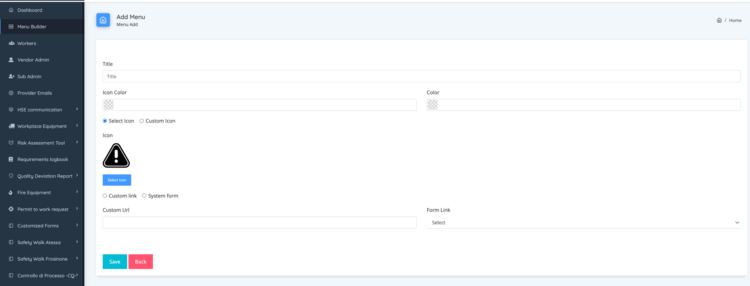
Step 3 — Add the form to the SpeakUp4Safety app menu (Menu Builder)
In the Menu Builder, users can add the newly created form to the app menu by selecting an icon and the preferred color. This allows each company to tailor the app to its safety management system and make critical workflows immediately accessible. Visibility can be configured for internal users and external users (vendors/contractors). Menu settings are dynamic, and the app updates in real time, ensuring rapid deployment across sites.

From data collection to measurable improvement: Dynamic table + CAPA logbook + risk evaluation
Every submission collected through your custom form is automatically indexed in a dynamic table, making it searchable, filterable and ready for analysis. Within the same workflow, SpeakUp4Safety integrates a CAPA logbook where each finding can be converted into corrective and preventive actions, with a risk evaluation linked to the record to support prioritization and decision-making.
- No data loss: forms don’t end as PDFs in folders — they become structured records.
- Faster CAPA closure: assign actions, set deadlines and track status in one place.
- Risk-based prioritization: associate risk evaluation to focus resources where it matters most.
- Trend visibility: use the dynamic table as the foundation for dashboards, KPIs and continuous improvement.
- Lower environmental impact: reduce paper consumption through document dematerialization, minimizing printing, copying and physical archiving.
Questions and answers on this topic
Do you have practical questions or want to go deeper into the topic? In this section we collect the most relevant questions asked by EHS professionals together with the official answers from the SpeakUp4Safety Team, to help you turn concepts into concrete actions.
Do you have a question about this topic?
Submit your question by email. It will be reviewed by our specialists and, if relevant for the community, published with an official response.
Privacy note: the information you provide will be used exclusively to respond to your request.