Digital management of compliance documents and deadlines with SpeakUp4Safety
If compliance deadline management still depends on spreadsheets, shared folders, and manual reminders,
it becomes hard to prove control during audits. The SpeakUp4Safety Requirement Logbook centralizes your
documents and deadlines in one place: PDF archive, automated alerts, QR codes
at point of use, admin customization, and CSV export ready for Power BI.
Always audit-ready
Find the right document version in seconds, with clear ownership and deadline traceability.
Fewer missed deadlines
Automatic reminders to process owners before expiration—no manual chasing.
Field access via QR
Scan an asset QR code to verify documents, inspections, and history on-site.
Why a digital logbook is the fastest route to compliance control
Compliance documents and deadlines are not “paperwork”: they are controls. When documents are scattered,
teams lose time, audits become stressful, and non-conformities increase. A digital approach gives you:
- Continuous compliance: reduce expired documents and missed periodic checks.
- Traceability: clear audit trail for versions, responsibilities, and status.
- Faster audits: evidence is accessible on-site via QR codes.
- Standardization: same rules across sites, contractors, and departments.
Internal note: if you also manage near-miss learning, link this workflow to your core reporting process.
See: Near Miss & Incident Reporting.
Compliance deadline management workflow: Archive → Alerts → QR at point of use
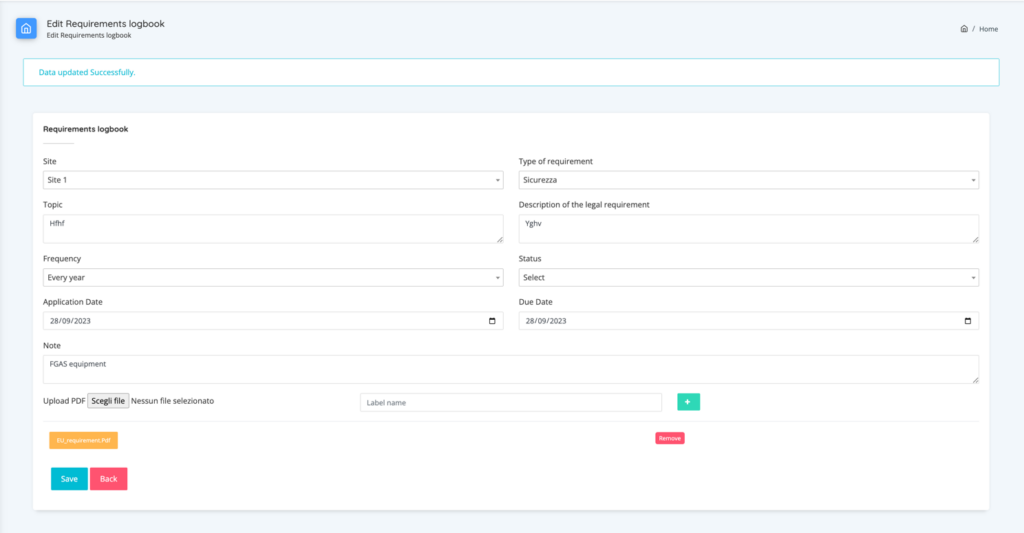
- Digital archive: each requirement includes metadata (site, type, frequency, status) and the PDF attachment.
This makes document retrieval and version control immediate. - Automatic alerts: before the deadline, SpeakUp4Safety sends email notifications to the process owner and
provides a clear “what to do next” action (renew, upload evidence, close task). - QR codes for audits: assign a QR code to an asset (e.g., hoist, forklift, pressure equipment). Auditors scan it to access
documents, inspections, and history—instantly.
latest certificate, last inspection report, next due date, responsible owner, and any open actions.
This reduces audit time and increases confidence in the system.
If you manage permits and authorizations, you can also align this with permit-to-work governance.
External reference: HSE – Permit to Work overview.
Admin customization and export to Power BI
SpeakUp4Safety is designed to be configured by your internal team. Users with admin role can configure modules, requirement types,
workflows, and notification rules—without external development. This means faster rollout and consistent governance.
All records are indexed with a unique ID and can be exported as CSV for analysis with Microsoft Power BI.
This unlocks dashboards for: overdue items, aging, risk hotspots, site comparison, and audit readiness trends.
Related: EHS Management Software overview.
Choose the right license by EHS maturity level
Different organizations need different levels of control. Use this quick self-assessment to select the license that best matches your
EHS management maturity—and scale when your program grows.
Level 1 — Getting structured
You are moving from spreadsheets to a controlled system. You need a reliable archive, reminders, and basic audit readiness.
- 1 site or small multi-site
- Basic roles and responsibilities
- Core compliance deadlines
Level 2 — Standardizing across teams
You want consistent workflows, approvals, and evidence quality across departments/sites. You need stronger governance.
- Multiple sites or contractors
- Approval workflows and ownership
- QR access on the shopfloor
Level 3 — Data-driven EHS leadership
You manage EHS performance with KPIs and BI. You need full traceability, advanced reporting, and scalable configuration.
- Power BI dashboards & KPI routines
- Cross-site comparisons
- Audit readiness at enterprise scale
Best practice: start with the license that matches your current governance, then expand when you standardize workflows and KPI reviews.
This creates adoption first, then scale—without overbuying.
Comparison with other EHS systems
Overview of features: document management, deadline alerts, QR codes, versioning, history, admin customization, CSV/Power BI export.
| Feature | Quentic | SALUS | DoCheck | Simpel | SpeakUp4Safety |
|---|---|---|---|---|---|
| Workflow approval | ✔︎ | — | — | — | ✔︎ |
| Deadline reminders / alerts | ✔︎ | ✔︎ | — | — | ✔︎ |
| QR codes for direct access | — | ✔︎ | ✔︎ | ✔︎ | ✔︎ |
| Document version check via QR | — | — | ✔︎ | ✔︎ | ✔︎ |
| Inspection reports linked to the asset | Partial | Partial | — | — | ✔︎ (full history) |
| Traceability & history | ✔︎ | Partial | Partial | Partial | ✔︎ |
| Admin customization | Limited | Limited | Limited | Limited | ✔︎ (modules, types, workflows) |
| Unique ID indexing | ✔︎ | — | — | — | ✔︎ |
| CSV export & Power BI analysis | CSV | — | — | — | ✔︎ CSV → Power BI |

FAQ
What is the SpeakUp4Safety Requirement Logbook?
It’s a module for compliance deadline management that centralizes documents and deadlines, attaches PDFs,
sends alerts, and generates QR codes for on-site audit access.
Can I customize modules and workflows?
Yes. Admins can configure templates, requirement types, permissions, and workflows—without external development.
Can I export data for analysis?
Yes. Records use a unique ID and can be exported as CSV for dashboards and KPIs in Power BI.
Bring compliance to the next level
Digitize documents and deadlines, accelerate audits with QR codes, and build KPI dashboards in Power BI.
If you tell us your maturity level (Level 1–3), we will recommend the most suitable license and a rollout path.
Prefer to start immediately? Review license options first, then we will validate fit during the demo.
Questions and answers on this topic
Do you have practical questions or want to go deeper into the topic? In this section we collect the most relevant questions asked by EHS professionals together with the official answers from the SpeakUp4Safety Team, to help you turn concepts into concrete actions.
Do you have a question about this topic?
Submit your question by email. It will be reviewed by our specialists and, if relevant for the community, published with an official response.
Privacy note: the information you provide will be used exclusively to respond to your request.